


Sidekick by Sorted Food
4.3282.00 Reviews
App Specs
- Version
- 3.5.0
- Updated On
- License
- Free
- Downloads
- 100,000+
- Developer
- Sorted Club
- Categories
- Food & Drink
- Platform
- Android, iOS
Screenshots
 Analysis by AppCompare
I judge meal-planning apps by whether they make the next dinner easier, not by how many recipes they can display. Sidekick by Sorted Food is most appealing when you want a guided route from choosing meals to getting ingredients ready, rather than another endless catalogue to browse. It is a free Food & Drink app from Sorted Club, and its focus on practical cooking gives it a clearer purpose than a general recipe bookmarker. My main reservation is that a guided plan can feel restrictive if you prefer to choose every dish and shop entirely on your own terms.
Where a plan can save real effort
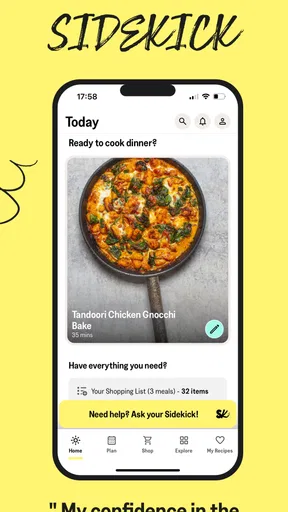
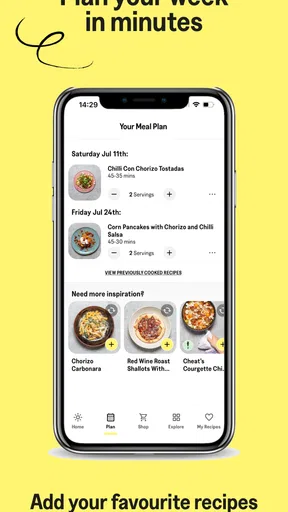
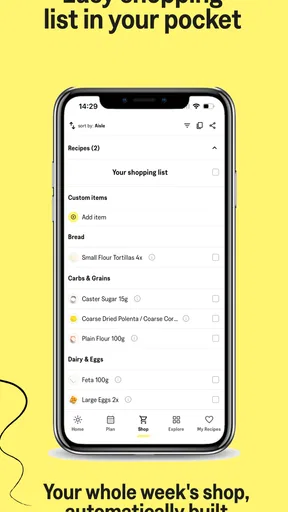
The useful idea behind Sidekick is the connection between meal choices and the shopping list. Instead of picking recipes in separate places and manually copying every ingredient, a planned set of meals gives you a more organised starting point. That can be a real help when the week is busy: decide what you might cook, check the ingredients together, and make one shopping trip with a purpose.
I would use that workflow before heading to the supermarket, not while already wandering the aisles. First, look over the dishes and remove anything that does not suit the week; then check the list against what is already in your cupboards. That small pause matters. A list is only useful if it reflects what you actually need, and checking pantry staples can prevent buying duplicates or letting another half-used ingredient linger at home.
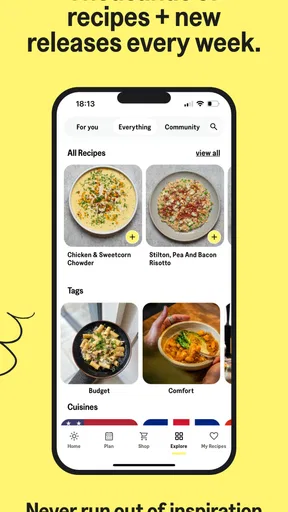
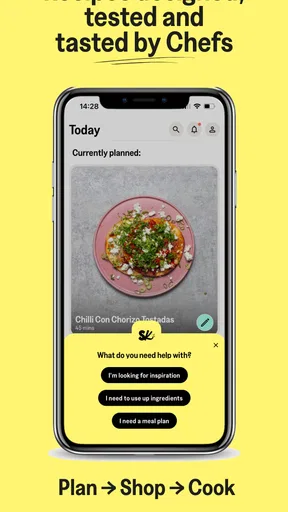
The planning approach also changes how I think about a recipe collection. A large catalogue is great when I have a particular craving, but it can leave the hardest question unanswered: what should I cook over the next few days? Sidekick’s meal-plan structure is better suited to that decision. In return, it asks you to accept more guidance than a search-first recipe app would.
What cooking guidance is worth having on screen
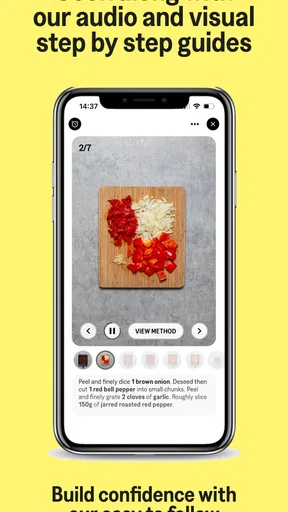
Step-by-step directions are especially useful when a recipe includes a technique I do not use often. I can keep moving through the instructions instead of trying to remember several stages at once, and a visual explanation can be clearer than a paragraph when the important detail is about what a mixture should look like. Timers and reminders can help keep attention on the food without requiring me to watch the clock constantly.
There is a practical trade-off, though: cooking from a phone means the screen is close to splashes, floury hands, and a crowded worktop. I would read the next step before starting a messy task, set any timer I need, and place the phone somewhere visible but out of the way. That is a simple habit, but it makes guided cooking less fiddly and reduces the temptation to handle the device mid-preparation.
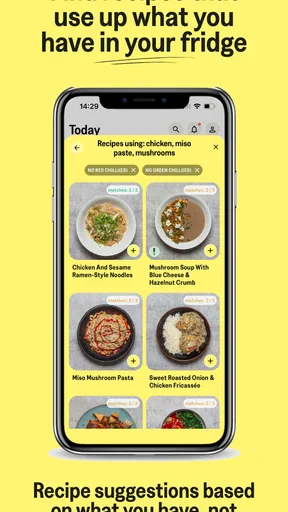
Ingredient substitutions are most valuable when treated as suggestions, not guarantees. A swap may help when a small item is missing, but it will not necessarily preserve the exact taste or texture of the original dish. I would be more comfortable replacing a garnish or a flexible seasoning than changing a main ingredient that defines the recipe. If a dietary restriction is strict, I would check every ingredient myself rather than assuming a suggested alternative settles the question.
Worth Reading Before You Choose

Flipboard Shows What News Apps Must Do Beyond the Feed

Switching to Android Auto Means Rethinking Your Driving Routine

Google Calendar Makes a Crowded Week Easier to Manage

Ludo King Makes the Most of the Minutes Between Plans

Baby Panda World Brings Quick Play to Modern Phones, but Its Game Library Feels Busy

ESPN’s Live Game View Makes Following Close Games Easier
Making the app fit your household
A realistic use case is a weeknight when I have limited time to decide what to make, but still want something more considered than ordering the same familiar meal. I could review a plan earlier in the day, check which ingredients are already available, and shop for the remaining items on the way home. Once in the kitchen, the guided steps can make it easier to start without first opening several recipe pages and translating them into a personal checklist.
That routine suits someone cooking for themselves or a household that is happy to try a few planned dishes. It may be less convenient if family members want completely different meals, if schedules change every night, or if you often cook from whatever happens to be left in the fridge. In those situations, a flexible search tool or a simple notes app may be a better fit than committing to a plan.
I would also treat the plan as a scaffold rather than a rulebook. Before shopping, check whether a planned recipe overlaps with food you already need to use, and decide whether the week’s schedule makes all the meals realistic. If one dish no longer suits, changing course is better than buying ingredients for a meal you are unlikely to cook. The app can organise decisions, but it cannot know which evening will unexpectedly run late.
How Sidekick fits among recipe apps
Compared with a conventional recipe site, where the main activity is searching, saving, and browsing individual dishes, Sidekick is more focused on turning meal choices into a coordinated cooking routine. Compared with planning everything in a spreadsheet or notes app, it offers a more recipe-centred path and can bring the shopping step into the same process. Neither approach is universally better: the right choice depends on whether you want help deciding or simply want a place to store your own decisions.
Limits to consider before relying on it
The main drawback of a curated approach is reduced freedom. If you already have a precise meal plan, a favourite collection of recipes, or a strict budget and ingredient strategy, a pre-arranged selection may create extra work rather than remove it. You may prefer a recipe database with powerful filters or your own list if choosing exactly what goes on the table is the enjoyable part for you.
There is also a difference between a helpful shopping list and a complete household inventory. Even when an app gathers ingredients for planned recipes, you still need to account for what is in your kitchen, what is running low, and what other people at home will eat. I would use the list as a draft to review rather than assume it can replace that judgement. This is particularly important if you are trying to minimise waste or avoid buying things you rarely use.
Sidekick is free to install, with in-app purchases listed from $5.49 to $104.99 per item. I would explore the basic experience before paying for anything and consider whether its planning style becomes part of my routine. The app is rated for Everyone, has a 4.4 average from around 1.7 thousand ratings, and has passed 100 thousand installs. Those figures suggest it has found an audience, but they do not tell me whether its approach will suit a cook who wants total flexibility.
Who I would recommend it to
I would recommend Sidekick to home cooks who want a nudge toward planning, appreciate guided instructions, and are open to trying meals they might not have selected by searching for one specific dish. It is particularly promising for someone who gets stuck at the “what’s for dinner?” stage, or who wants shopping and cooking to feel like parts of the same job instead of disconnected chores.
I would hesitate to recommend it to a cook who already has a reliable system, needs extensive control over every recipe choice, or regularly changes plans at the last minute. It is also not a substitute for checking ingredients carefully when allergies or strict dietary requirements are involved. In those cases, independent verification and a more flexible planning method matter more than convenience.
For someone deciding whether to keep using it, I would judge it over an ordinary week rather than by browsing its recipes once. Does the plan help you shop with fewer forgotten items? Do the instructions make a new dish feel manageable? Do you actually cook the meals you selected? If the answer is yes, the structured approach is doing useful work. If you keep ignoring the plan and searching elsewhere, a simpler recipe app may suit you better.
Sorted Food released Sidekick on November 6, 2019, and version 3.1.0 requires Android 7.0 or later. I see it as a focused cooking companion, not a magic fix for every kitchen problem. Its strongest case is the practical link between planning, shopping, and following a recipe; its weakest is that the same structure can feel like an unnecessary layer for confident improvisers.
If you're a food lover like me, you're probably always on the hunt for new and exciting recipes to spice up your kitchen game. Well, let me introduce you to Sidekick by Sorted Food. This app isn't just another recipe collection; it's like having a culinary best friend in your pocket, ready to inspire and guide you through delicious adventures.
Getting Started with Sidekick
When I first launched Sidekick by Sorted Food, I was immediately struck by its sleek and user-friendly interface. It’s designed to make you feel at home, whether you're a seasoned chef or a kitchen newbie. The app kicks off with a short tour to help you navigate its features, which I found super helpful. After that, you're asked to set up your profile by selecting dietary preferences, which ensures that the app tailors recipes to fit your lifestyle.
Exploring the Features
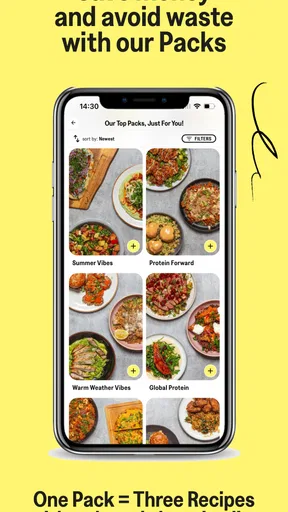
One of the standout features of Sidekick is its weekly meal plans. These aren't just random selections; they're carefully curated to offer variety while keeping your shopping list short and sweet. Each plan includes three recipes, and I loved how each one focused on a different theme or cuisine. From Italian classics to vibrant Asian dishes, there’s something for every palate.
The app also boasts a dynamic shopping list feature. As you browse through the meal plans, Sidekick automatically compiles a list of ingredients you’ll need. It’s a breeze to use, and you can easily tick off items as you shop. Plus, there’s an option to check off items you already have in your pantry, which helps in reducing food waste.
Cooking with Confidence
Let’s talk about the recipes themselves. Sidekick provides step-by-step instructions that are easy to follow, complete with timers and reminders. As someone who’s always multitasking in the kitchen, these features are a lifesaver. The app also includes short video clips for those tricky steps that need a visual guide. I found this particularly useful for mastering new techniques.
Another cool aspect is the ingredient swapping tool. If you’re missing an ingredient or trying to cater to specific dietary needs, Sidekick suggests alternatives. This flexibility ensures that you can still whip up a delicious meal without last-minute grocery runs.
Community and Inspiration
One of the things that sets Sidekick apart is its vibrant community aspect. The app encourages you to connect with fellow users, share your cooking experiences, and even post photos of your culinary creations. It’s like having a supportive community cheering you on, and it’s a great way to pick up tips and tricks from other food enthusiasts.
Additionally, the app offers a wealth of inspirational content. From articles on food trends to deep dives into specific ingredients, Sidekick keeps you informed and inspired. I found myself spending time exploring these sections, which often sparked new ideas for my meals.
Wrapping it Up
After spending some quality time with Sidekick by Sorted Food, it’s safe to say I’m hooked. The combination of curated meal plans, intuitive features, and community interaction makes it a must-have for anyone looking to elevate their cooking game. Whether you're looking to try new cuisines or streamline your meal prep, Sidekick is there to guide you, making every culinary journey fun and stress-free.
So, if you're ready to transform your kitchen experience, I highly recommend giving Sidekick a try. It’s more than just an app; it’s your personal sous-chef ready to help you create magic in the kitchen.
Pros
- Intuitive user interface for easy navigation.
- Wide variety of recipes for diverse tastes.
- Personalized meal plans based on preferences.
- Interactive shopping list feature for convenience.
- Regular updates with new recipes and features.
Cons
- Requires internet connection for full functionality.
- Limited offline access to recipes.
- Some features locked behind a subscription.
- Occasional app crashes reported by users.
- No integration with other meal planning apps.
FAQs for Sidekick by Sorted Food
What is Sidekick by Sorted Food and how does it work?
Sidekick by Sorted Food is a meal planning app designed to simplify your cooking routine. It offers weekly meal plans, curated shopping lists, and step-by-step recipes created by professional chefs. The app is geared towards helping users save time and reduce food waste by providing easy-to-follow instructions and using common ingredients.
Is Sidekick suitable for people with dietary restrictions?
Yes, Sidekick caters to various dietary preferences and restrictions. The app allows users to filter recipes based on dietary needs such as vegetarian, vegan, gluten-free, and more. This customization ensures that everyone can find delicious meal options that suit their specific dietary requirements.
Can Sidekick help me save money on groceries?
Absolutely. Sidekick is designed to help users reduce food waste and manage grocery costs by providing precise shopping lists that utilize ingredients across multiple recipes. This approach minimizes unnecessary purchases and ensures you only buy what you need, helping to keep your grocery bill in check.
Does Sidekick offer a free version or trial?
Sidekick offers a subscription model, but new users can often take advantage of a free trial period. This allows potential subscribers to explore the app's features and decide if it fits their meal planning needs before committing to a paid plan. Always check the app for current trial offers.
Is Sidekick user-friendly for beginners in cooking?
Yes, Sidekick is designed with beginners in mind. The app provides clear, step-by-step instructions and visual aids for each recipe, making it easy for users with little cooking experience to follow along. The goal is to build confidence in the kitchen while enjoying delicious meals.


